In the Keyman project, we try to add automated tests for all the code we write — to make sure that we don’t break assumptions when we make future changes, and to verify that what we wrote actually works the way we expect it to.
Recently, I made a change to the Keyman for Windows Engine, removing some unused code, and cleaning up a function that tests whether the currently active Windows keyboard has specific support for the Right Alt (AltGr) key. This is important in Keyman, because, and I quote from the source code:
Background: when a Windows system keyboard that maps RightAlt (AltGr) is active, Windows will internally generate LeftCtrl+RightAlt events when the RightAlt key is pressed, so we need to recognize this and mask out the Left Control modifier state when it happens.
All well and good so far. When the system keyboard does support Right Alt, the KLLF_ALTGR flag is set in its metadata. And Keyman respects this flag so its keyboards function as expected for users.
I added a unit test for this change, to verify that reading this flag from the Windows system keyboard worked correctly. I chose to test against KBDUS (US English) and KBDA1 (Arabic 101), for the case where the KLLF_ALTGR flag is not set, and against KBDFR (French AZERTY) and KBDCZ (Czech), for the case where the KLLF_ALTGR flag was set.
The tests worked just fine, so I merged the pull request.
Fast forward to the 10th of December
The Keyman for Windows test builds can run on one of four different build agents, ba-win11-key-01 through -04. Builds had been running happily, but all of a sudden, the tests started failing for Keyman for Windows, for unrelated branches in the Keyman source, some of which didn’t even change Keyman for Windows code at all!
Even worse, the builds started failing on some agents but not on others, but over the course of the next day or so, all the agents started to fail!
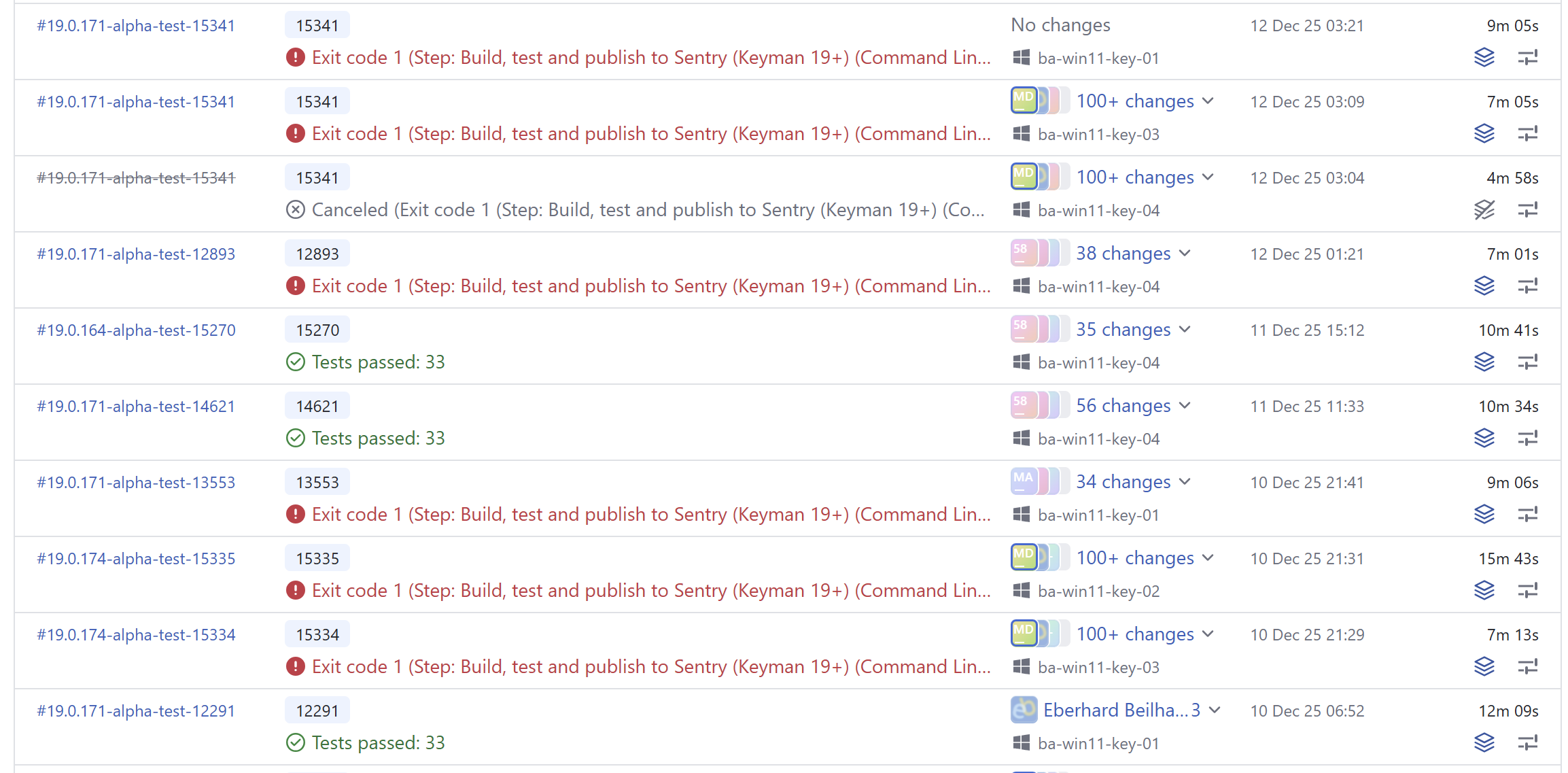
The failure was always on the same test, in the unit test I had just added. For reference, the ReadAltGrFlagFromKbdDll function call in the failing test was being passed the Keyboard Layout ID (KLID) 00000401, which is the KLID for KBDA1.dll.
21:36:22  [----------] 1 test from RightAltEmulationCheck
21:36:22  [ RUN ] RightAltEmulationCheck.ReadAltGrFlagFromKbdDll
21:36:22  C:\BuildAgent\work\7ac43416c45637e9\keyman\windows\src\engine\keyman32\tests\RightAltEmulationCheck.tests.cpp(14): error: Expected equality of these values:
21:36:22  ReadAltGrFlagFromKbdDll("00000401")
21:36:22  Which is: 1
21:36:22  0
21:36:22  [ FAILED ] RightAltEmulationCheck.ReadAltGrFlagFromKbdDll (40 ms)
21:36:22  [----------] 1 test from RightAltEmulationCheck (40 ms total)
I started to worry that we were running into some sort of race condition, and wondered if this was causing issues for end users also. At this point, I had no idea what the root cause was. Can you guess?
I took on the task of investigating
As always, I opened an issue to track the problem.
First, I wanted to check that the build was running successfully on my machine. And surprisingly enough, it failed! Why? It was working a couple of days earlier.
Of course, this made it easier to investigate. Here was the failing test. I was checking that the AltGr flag was not set for kbda1.dll:
EXPECT_EQ(ReadAltGrFlagFromKbdDll("00000401"), FALSE); // kbda1.dll - Arabic 101Clearly something had changed, somewhere.
The test was going wrong consistently, which meant that it probably wasn’t a race condition. I started by examining my assumptions about KBDA1.DLL. I took a look at the file on my machine:
marc@QUAMBY MINGW64 /d/Projects/keyman/app/windows/src/engine/keyman32 (master)
$ ls /c/windows/system32/kbda1.dll  -l
-rwxr-xr-x 2 marc 197609 24576 Dec 11 15:43 /c/windows/system32/kbda1.dll*

marc@QUAMBY MINGW64 /d/Projects/keyman/app/windows/src/engine/keyman32 (master)
$ ls /c/windows/system32/kbdus.dll  -l
-rwxr-xr-x 2 marc 197609 36864 Jun 12 20:53 /c/windows/system32/kbdus.dll*
Well, that was interesting! kbda1.dll had been updated, just one day earlier! Only one thing would have changed that — a Windows Update. And sure enough, there was an update.

I took a quick look at the Learn more link to Microsoft article KB5072033, but did not see anything immediately relevant. It was listed as a Security Update.
Digging into the binary
So I imported KBDA1.DLL into Keyman Developer, and sure enough, there was a new rule in the resulting .kmn file:
+ [RALT K_S] > U+20c1What is U+20C1? It is a brand new currency symbol, the Saudi Riyal symbol:

The Saudi Riyal currency symbol was added to Unicode 17.0 in September 2025.
And that was the cause of the problem. Adding this one key to a new AltGr layer on the Windows KBDA1.DLL keyboard caused that the KLLF_ALTGR flag to be set for the keyboard, which caused my unit test to fail!
I already knew
Somewhat hilariously, I was involved in a discussion in the Unicode CLDR Keyboard Working Group way back in September 2025, where we talked about the Saudi Riyal symbol and where it should be placed on the Arabic keyboard — and I had learned at that time that AltGr+S was the chosen location! But I had forgotten all about that when I chose KBDA1.DLL as my victim for my unit test.
More evidence from Microsoft
Later, I returned to the Windows Update post. Buried in that article was a link to another article KB5070311, which had a Change Log section:
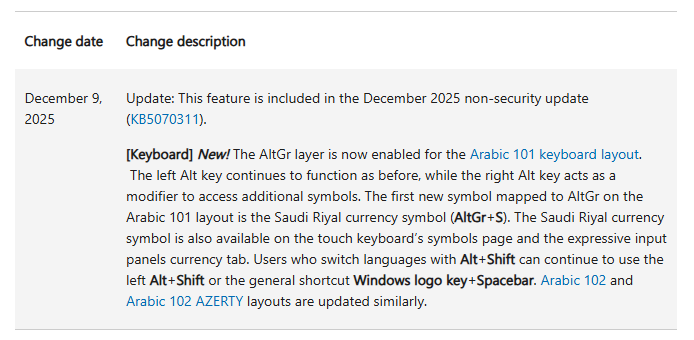
December 9, 2025: Update: This feature is included in the December 2025 non-security update (KB5070311).
[Keyboard] New! The AltGr layer is now enabled for the Arabic 101 keyboard layout. The left Alt key continues to function as before, while the right Alt key acts as a modifier to access additional symbols. The first new symbol mapped to AltGr on the Arabic 101 layout is the Saudi Riyal currency symbol (AltGr+S). The Saudi Riyal currency symbol is also available on the touch keyboard’s symbols page and the expressive input panels currency tab. Users who switch languages with Alt+Shift can continue to use the left Alt+Shift or the general shortcut Windows logo key+Spacebar. Arabic 102 and Arabic 102 AZERTY layouts are updated similarly.
Fixing the problem
I swapped out KBDA1.DLL for KBDTH0.DLL (Thai Kedmanee). The tests passed again. Huzzah!
I also took the opportunity to improve the function to separate failure from flag and test both separately:
  // kbdth0.dll - Thai Kedmanee
  EXPECT_EQ(ReadAltGrFlagFromKbdDll("0000041e", result), TRUE);
  EXPECT_EQ(result, FALSE);
Postmortem
The eagle-eyed among you will have spotted that I had violated a unit test principle here: I had a test that was dependent on the environment, which made it fragile. Now, I thought that my choice of environmental dependency was pretty safe, but it looks like I was wrong!
Sadly, my patch does not attempt to address this fragility, because it just swaps to another keyboard that could change at any time (but surely it won’t, right?) — because making the test more stable would require adding static fixtures to the codebase, and the cost just doesn’t seem worth it at this point.
And there we have it, the Case of the Saudi Riyal Currency Failing Test.
Next time it goes wrong, I’ll fix it properly I promise.